What Is Docker? A Simple Explanation for Beginners and Old-School Server Admins
 Written by adminNovember 6, 2026
If you have ever heard someone say, “Just run it in Docker”, you may have wondered what that really means.
Let’s explain it in the simplest way possible — almost like explaining it to a 9-year-old — but also in a way that makes sense for experienced server administrators from the old school.
What Is Docker?
Imagine you have a toy box.
Inside that box, you place everything needed to play with one toy: the toy itself, its batteries, its instructions, and all its little parts.
That way, you can carry the box anywhere, open it, and everything works the same way every time.
Docker is like that toy box, but for applications.
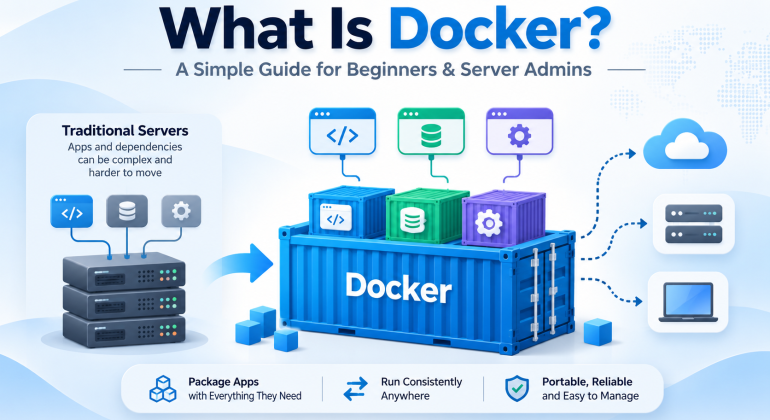
It puts an application together with everything it needs to run — libraries, settings, tools, and dependencies — inside something called a container.
So… What Is a Container?
A container is a small, self-contained package where an application lives.
You can move that container from one computer to another, and it should work almost the same way everywhere.
That is why people love Docker: it helps avoid the classic problem of:
“It works on my machine, but not on the server.”
Docker Explained Like You’re 9 Years Old
Let’s pretend you want to make sandwiches.
If every kitchen is different, you may not find the same bread, knife, cheese, or plate. That makes your job harder.
Now imagine you have a magic lunchbox that already contains:
- the bread,
- the cheese,
- the knife,
- and the instructions.
You take the lunchbox anywhere, open it, and make the same sandwich every time.
That lunchbox is like Docker.
The sandwich is your app.
The lunchbox is the container.
Why Is Docker Useful?
Docker is useful because it helps developers, IT technicians, and server administrators run applications in a cleaner and more predictable way.
- Consistency: The app works the same on different machines.
- Portability: You can move containers between systems more easily.
- Speed: Deployments are usually faster.
- Isolation: One app is separated from another.
- Simpler maintenance: Updates and changes are easier to organize.
Why Old-School Server Admins Should Care
Many experienced server administrators are used to installing software directly on the operating system:
- install the package,
- configure services manually,
- edit files,
- fix missing dependencies,
- and troubleshoot conflicts later.
That approach still works, but Docker offers a more modern and flexible way.
Instead of configuring everything manually on the server, you can package the application once and run it repeatedly in the same way.
For old-school admins, Docker can be a major advantage because it helps:
- reduce installation conflicts,
- test services safely,
- spin up labs quickly,
- deploy web apps faster,
- and simplify migrations between servers.
Real-Life Example
Let’s say you want to run:
- a website,
- a database,
- and a management tool.
Traditionally, you might install everything directly on one server and spend time making sure all versions match.
With Docker, you can run:
- one container for the website,
- one container for the database,
- and one container for the management tool.
Each one stays in its own space, which makes the setup easier to control.
Does Docker Replace Virtual Machines?
Not exactly.
Virtual machines are like full houses. Each one has its own full operating system.
Containers are more like apartments inside one big building. They share the main structure, so they are lighter and faster to start.
That means:
- Virtual Machines: heavier, full OS, great for full isolation.
- Docker Containers: lighter, faster, ideal for many application workloads.
How Can You Take Maximum Advantage of Docker?
Here are practical ways to get the most from Docker:
- Use it for testing: Try apps without changing your main server too much.
- Standardize deployments: Keep the same app behavior in dev, test, and production.
- Run multiple services cleanly: Separate your web app, database, and tools.
- Learn Docker Compose: It helps manage multiple containers together.
- Create repeatable environments: Great for demos, labs, and training.
- Document your containers: Helps teams and future admins understand your setup.
- Combine with backups and monitoring: Containers still need good administration.
Important Reminder
Docker is powerful, but it is not magic.
You still need:
- security best practices,
- proper backups,
- update management,
- good network configuration,
- and access control.
In other words, Docker does not remove the need for good server administration — it just gives you a smarter way to package and run applications.
Final Thoughts
Docker is one of the most useful technologies for modern IT operations because it makes applications easier to move, easier to test, and easier to manage.
If you are new to IT, think of Docker as a smart box that carries an app with everything it needs.
If you are an experienced server administrator, think of Docker as a practical way to reduce setup headaches and make deployments more consistent.
Different generation, same goal: make systems work better with less friction.
Need Help with Servers, Containers, or IT Infrastructure?
At Hudson Garden IT, we help businesses and professionals simplify technology, modernize infrastructure, and improve reliability across their IT environments.
Contact us today to learn more about practical IT solutions for your business.